

Libra.setDocumentSuggestion(doc) suggests an external document the user is currently viewing. A suggestion chip (”+ [title]”) appears above the message input, labeled with the root document’s title, and the SDK checks the whole group (root plus any attachments) against the integrator’s FAB index in the background by calling POST /api/v1/external-documents/availability. When the chip is clicked, every missing group member is attached to the composer if the group is available and the LLM can retrieve their content; if the check is still pending, the chip shows loading and attaches after it succeeds, or shows unavailable/error feedback if it fails. If the background check already found the group unavailable (409) or hit another error, the first click shows that result without checking again; a later click retries. Calling this again replaces the previous suggestion.
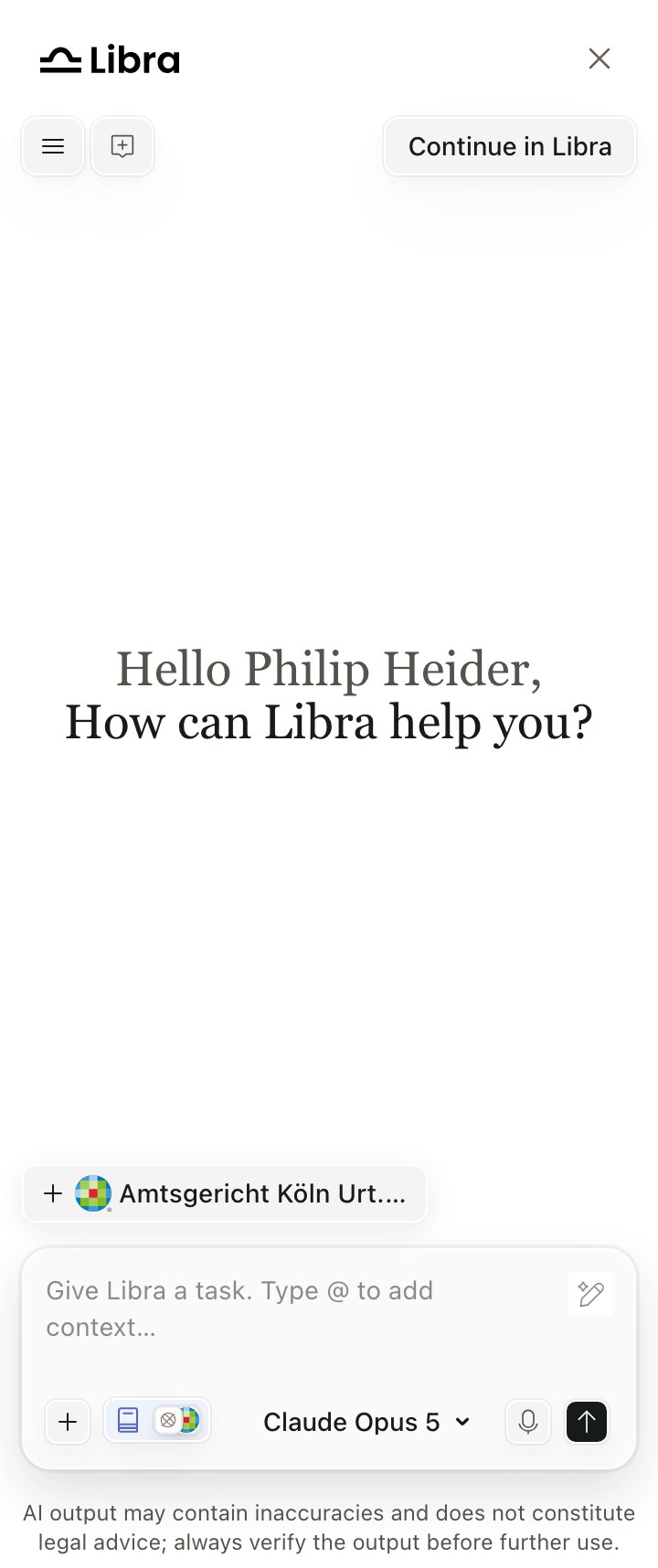
The suggestion chip above the composer, after setDocumentSuggestion()
Attachments
Optionalattachments let you suggest related files (for example PDFs) alongside the primary document. Each attachment has the same required fields as the root document (id, title, url, source). Availability is atomic per group: a partial FAB miss attaches nothing and shows the “Content unavailable” notice. The chip stays visible until every group member (root + attachments) is already attached.
It does not track navigation
The chip shows one label — the root document’s title — even when the suggestion is a group. It has no awareness of your page, so your product must drive it:- Call
setDocumentSuggestion()on every document change. Each call replaces the previous suggestion. - Call
clearDocumentSuggestion()when the user leaves the document, or the stale chip persists — including into a new chat. - Re-supply it after a full page navigation. Suggestion state is in-memory only and does not survive a page load, unlike the chat itself.
Clearing
Libra.clearDocumentSuggestion() clears the current document suggestion, for example when the user navigates away from the document.
What “attached” means
The document joins the same composer attachment row as an uploaded file, but it is not an upload: no file transfer, no indexing, and no document quota consumed. Libra retrieves the content on demand at answer time from your FAB index. Its chip opens the source URL in a new tab rather than a preview, and the model cites it as an external-document citation.What the user sees when it is unavailable
Availability is checked in the background as soon as the chip appears, and is atomic per group — if any member is missing, nothing is attached.
Only two of the three reasons in that notice are signals Libra actually receives — entitlement and FAB-index presence. “Still processing” and “restricted from AI use” are plausible explanations for an index miss, which is why the copy lists them together.
When the document is cited
When the LLM cites the document in its response, the citation behaves like any other; see Citation clicks for how to intercept navigation. An external-document citation arrives withkind: 'external_document' and carries the source you supplied.
Requirements
sourcemust be aResearchSourceIdother thanweb_search; see Products and sources.- The document must be indexed in your product’s FAB index. The SDK only offers the document; retrieval of its content happens on the Libra side through that index, which is why availability is checked before attaching.
- The types are
ExternalDocumentandExternalDocumentAttachment; see the types reference.