
Wolters Kluwer product material calls this the Libra Add-in. These docs say embedded widget, to keep it distinct from the Word and Outlook add-ins — a separate surface whose conversations live in their own list and do not appear here.
What the widget is
It is the Libra chat, running in an isolated iframe inside your product, signed in as the user’s own Libra account. Conversations, projects, uploaded files and assistants are the same records the user sees in the Libra Workspace — not a copy. A chat started in the widget can be finished in the Workspace and vice versa.The chat surface
Composer, answer modes, voice input, answer actions, and how citations are presented.
Context and sources
Research sources, the document on screen, uploads, @-mentions, projects and history.
Plans and limits
What each subscription includes, the usage limits, and what only the Workspace can do.
Products and sources
Every
productId and ResearchSourceId the SDK accepts.What it does, in one screen
Research grounded in the product’s Wolters Kluwer sources, answers that cite what they used, and the document the user is reading available as context in one click.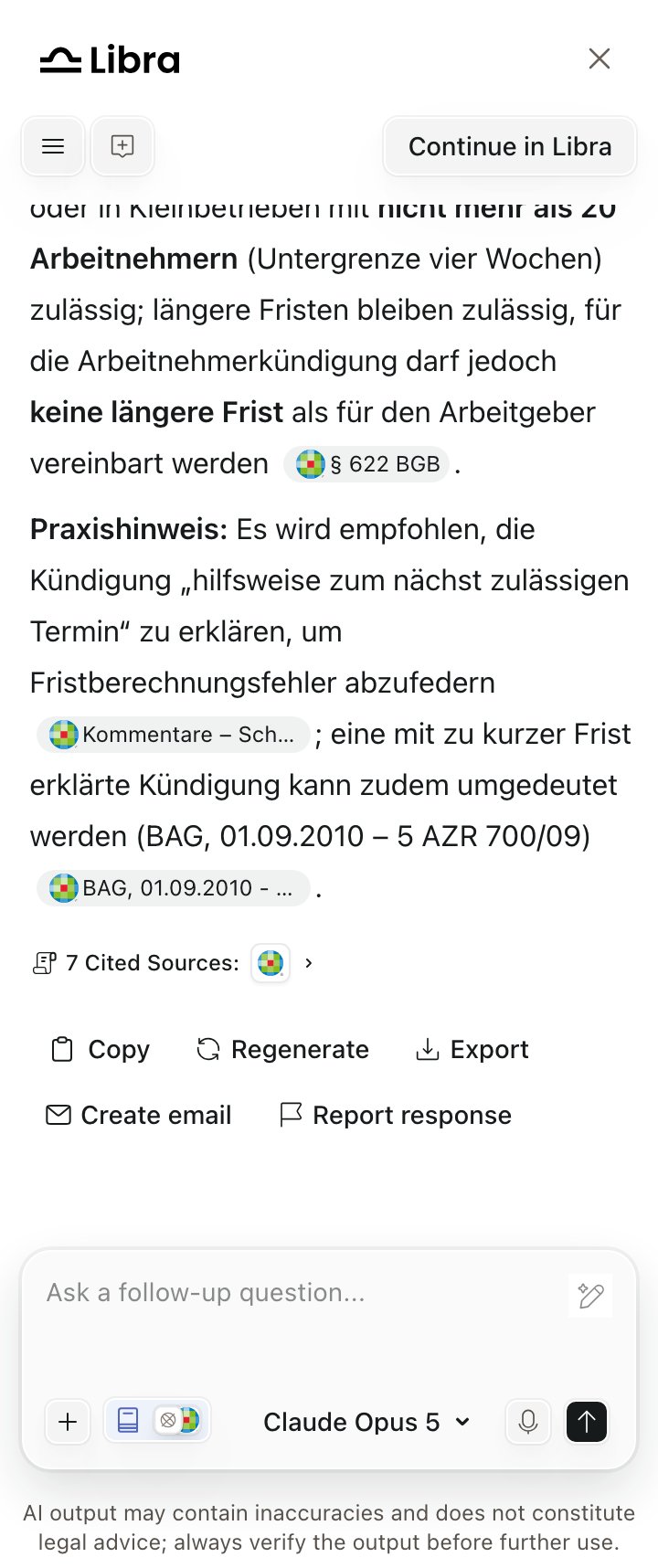
An answer in the embedded widget: inline citation chips, the cited-sources row, and the answer actions
What is in the widget, and what is not
Users reach the Workspace through Continue in Libra, which opens the same conversation in a new browser tab. See Chat handoff.
Fourteen languages
en-US, de-DE, de-CH, pl-PL, nl-NL, nl-BE, fr-BE, fr-CH, it-IT, it-CH, ro-RO, hu-HU, cs-CZ, sk-SK — switchable at runtime without losing the conversation, and the sign-in screen follows the same language. See Locales.