

Research sources
The Research control opens the same source selector as the Libra web app: per-source switches and a jurisdiction picker, with the active sources’ logos stacked on the button.- Only sources the user’s team is connected or entitled to can be switched on. Others show a Connect action.
- Changing a jurisdiction changes the user’s Libra profile globally — it is not a per-chat filter.
- A footer button, View all Libra integrations, opens Integrations settings in the Libra web app in a new browser tab.
What the SDK pre-selects
productId and researchSources are orthogonal, and this trips people up:
researchSources empty and nothing is pre-selected — the user’s own Libra defaults apply. Ids the user is not entitled to are silently dropped once the source catalogue loads, so pre-selection is a request, not a guarantee. Whatever is selected is persisted per project when the user changes it.
The document on screen
When your product tells the widget which document the user is reading, a chip appears above the composer: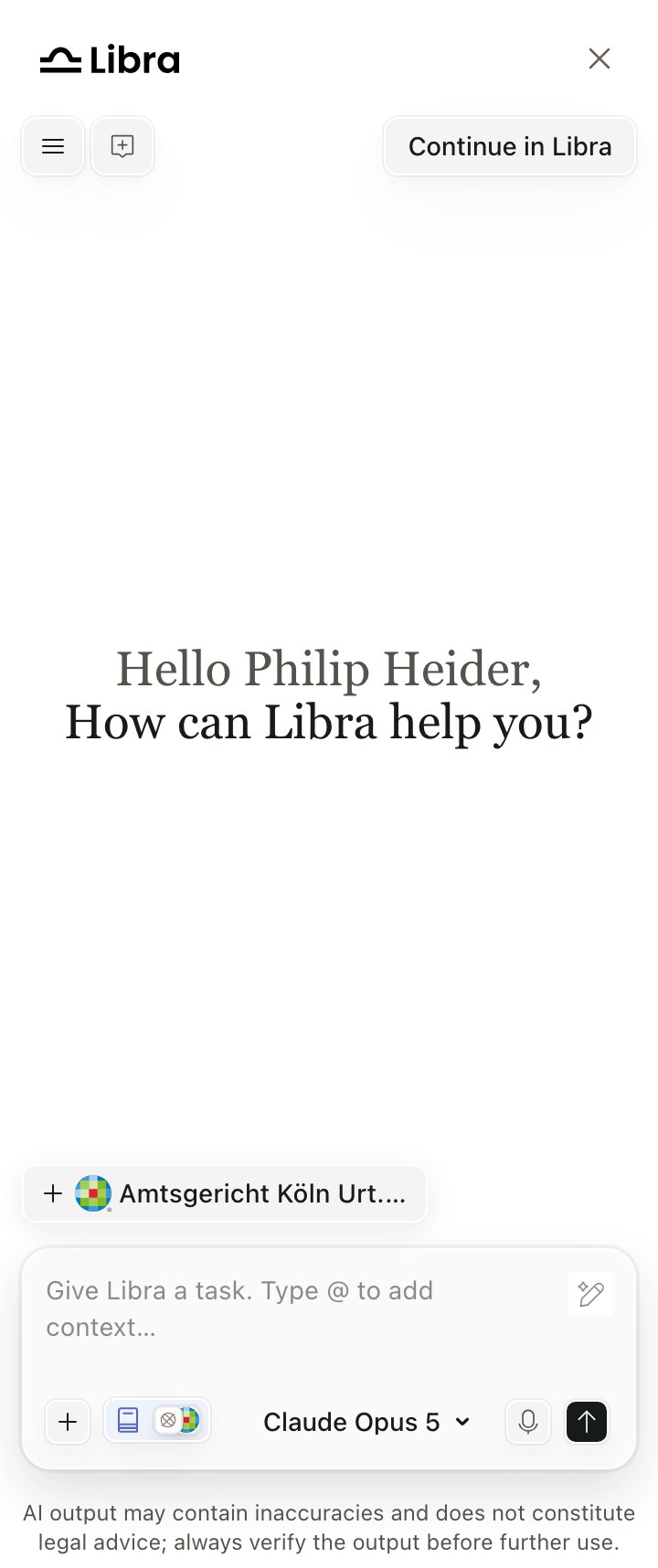
The suggestion chip, showing the root document's title
- The chip shows one label — the root document’s title — even when the suggestion is a group with
attachments. - It does not track navigation. Your product must call
setDocumentSuggestion()on every document change andclearDocumentSuggestion()when the user leaves, or a stale chip persists, including into a new chat. - Clicking it attaches the whole group. The document is attached as an external document: no file transfer, no indexing, and no upload quota consumed. Libra fetches the content at answer time from your FAB index.
- The chip disappears once every member of the group is attached.
Uploads
Users can pick or drag several files at once; uploads run five at a time. Per file the ceiling is 500 MB (32 MB for inline chat images), and unsupported types are rejected individually. Attachments appear as pills above the composer — the first six inline, the rest collapsed into a+N overflow with the same per-item delete and a clear-all. The row holds every kind of attachment, not just uploads.
Beyond local files, the attach menu can offer SharePoint (needs team consent plus a user connection), and, where enabled for the team, Kleos and RA-MICRO. Which of these appear varies by team entitlement, so treat the menu composition as configurable rather than fixed.
Uploading can be switched off entirely for a team as a compliance measure, which removes every way a user can add a file — the attach row, drag-and-drop and image paste — and rejects uploads at the backend. It does not affect host-supplied document suggestions. It is off by default and arranged with Libra, not through
Libra.init().The Tools menu
The+ Tools button opens up to five rows, in order:
Mentions (@)
Typing @, or choosing Add context, opens an inline picker over five sections — Assistants, Documents, Discoveries, Reviews, Playbooks — hiding any section with no matches, so a given user may only ever see two. Documents covers the current project, connected collections, folders and individual files. Arrow keys move, Enter confirms. Picking an assistant switches the conversation to it; picking anything else attaches it to the turn.
Projects and chat history
Both open from the hamburger Menu.- Chat History lists the chats of the currently selected project only, and the search box filters by chat title, not message content. The panel covers the 50 most recently updated chats in that project.
- Projects is a searchable selector over the user’s projects. Switching project starts a new chat. Opening a chat that belongs to another project reactivates that project.
- Each project card shows an access pill — Just me, Everyone in <team>, or Shared. The per-card context menu is not shown in the widget, and creating projects is Workspace-only.
Across surfaces
A chat started in the widget and a chat started in the Libra Workspace are the same server-side record, with the same attachments and the same active assistant. Open it in either place, or hand it off with Continue in Libra. Three boundaries:- The active selection does not sync. The widget and the Workspace each remember their own last-open chat and active project.
- Word and Outlook add-in chats are a separate set and appear in neither list.
- Re-reading a host-supplied external document is entitlement-checked on every request, so a document readable inside the product session can be refused when the same chat is continued in the Workspace.